You can copy all the files in this folder to another location, such as a USB disk or cloud storage.
The default data folder for ezACH is:
C:\Users\Public\Documents\Halfpricesoft\ezACH
Open Programs and Features by clicking the Start button , clicking Control Panel, clicking Programs, and then clicking Programs and Features. Select ezACH from program list, and then click Uninstall.
The default folder for ezACH is
C:\Users\Public\Documents\Halfpricesoft\ezACH
The default application folder is:
C:\Program Files (x86)\Halfpricesoft\ezAch Deposit
Note:
- If your computer caches data, please clean your download folder.
When reinstalling, choose the option to install the software for "Everyone" if possible. This will help prevent most potential permission-related issues.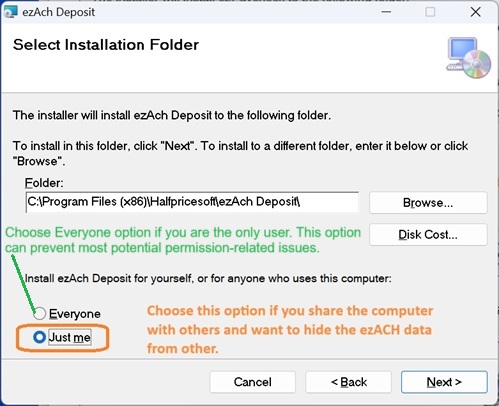
ezACH database file is .mdb file and this file is password protected. Please do NOT open this file manually or with Microsoft Access. You must open the file with ezACH software.
Please restore ezACH data and read it with ezACH software.