HalfpricesoftHalfpricesoft

QuickBooks Troubleshooting: Amount Printing Issue

Who can use this guide?

This guide is for users who are using ezCheckPrinting to print QuickBooks checks.

Problems:

Wrong Amount: When printing a QuickBooks check intended for '$110.12', the amount appears as "$710.12" on the check.

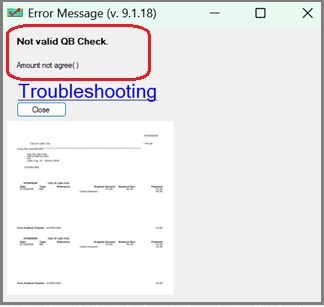
Error Message: Invalid QB check - Amount not agree


This amount printing error can occur for several reasons. Follow the steps below to resolve the issue. If you need further assistance, please follow the last step and send us the data file "qbfile0001.txt".

Temporary Solution:

If you need to issue checks now, you can try the temporary solution.

Blank stock check printing: two-step solution
Solution:

Step 1: Update ezCheckPrinting and Virtual Printer (*****)

Recent QuickBooks format changes may cause this issue. Updating to the latest version of ezCheckPrinting and the virtual printer can resolve most date-related errors.

How to check my version and update

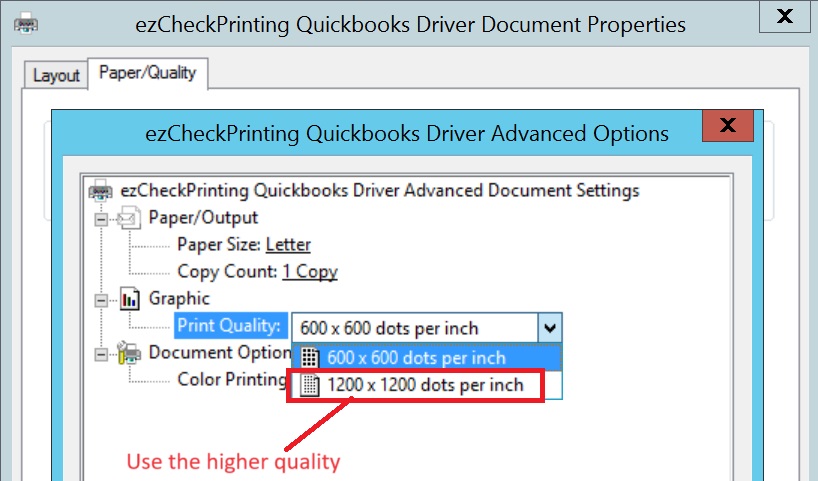
Step 2: Adjust Printer Settings.(**)

Your printer may be in ink-saving mode, resulting in poor quality check data being transferred to the virtual printer.

- Click on QuickBooks top menu "Help"> "Printer Setup".

- Select "Check/Paycheck"

- Click "options" to edit printing options.

- Select the higher printing quality to ensure better data transfer.


Step 3. Still Need Help? Send us the data file.

4.1. Print a check from QB to duplicate this error by follow step 3 in this guide.


http://www.halfpricesoft.com/quickbooks-check-printing/print-quickbooks-checks.asp

4.2. Then email us this file "qbfile0001.txt" to services@halfpricesoft.com as attachment.

The location of this file is:
C:/Users/Public/Documents/Halfpricesoft/ezCheckPrintingQBImport/qbfile0001.txt

4.3 Specify your system information also in your message


1) The version numbers of your ezCheckPrinting and virtual printer?

How to know the version number of my installed ezCheckPrinting and virtual printer?

2) QuickBooks online, Desktop 2025, , or others?

We will check this issue as soon as possible after we receive the data file.


QuickBooks check printing softwareezCheckPrinting for QuickBooks allows QuickBooks users to print checks on blank stock with MICR encoding and logo in house. You can also use it to fill out preprinted blank checks also.

If you have not installed this software, you can download and try it free with no obligation and no credit card needed.

ezCheckPrinting for QuickBooks is compatible with Windows 11, 10, 8.1, 8, 7, Vista, XP and other Windows computers.


Related Links:

  • Quick Start Guide: how to print QuickBooks checks?


  • How to customize check layout?


  • How to change the check number?


  • How to print QuickBooks compatible MICR blank checks?


  • How to print QuickBooks checks in different formats?


  • Tips on printing checks for QuickBooks?


  • How to use ezPaycheck payroll software with QuickBooks?


  • How to use ezW2 software with QuickBooks?


  • How to use ez1099 software with QuickBooks?


  • How to use ez1095 ACA form software with QuickBooks?