HalfpricesoftHalfpricesoft


    1099 Form Printing: How to Adjust Printing Position

    ez1099 software fills in and prints data on 1099 form copy A for IRS return. Here are the solution for alignment issue.

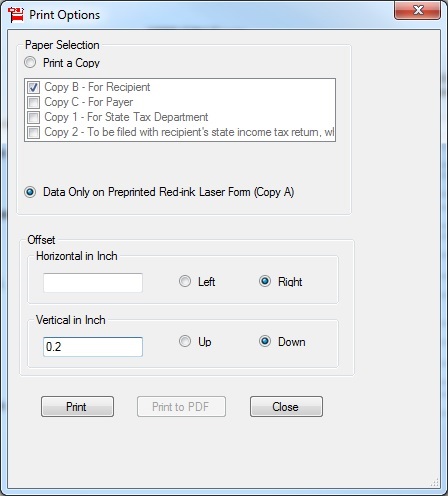
    #1: Change the ez1099 offset value to adjust alignment

    Most customers should be able to print forms with default set up. If your printer feeds paper differently, you can edit the offset values to adjust printing position. ie: you can increase the value for Up to print data higher.


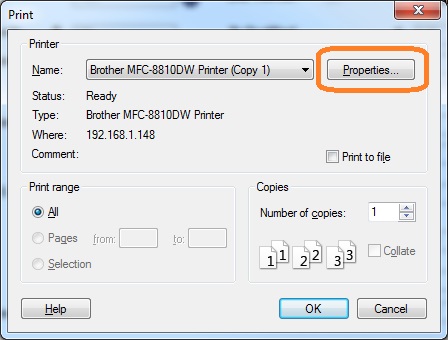
    #2: Check printer properties

    You may also check printer properties and make sure you did not resize the form.
    - You should use letter size paper.
    - You should print at 100% size. Do not choose the feature "Fit to paper size" or auto scale or double side printing feature, which may shrink form automatically.


    1099s software
    ez1099 software can prepare, print and efile forms 1099 forms (1099A, 1099B, 1099C, 1099CAP, 1099DA, 1099DIV, 1099G, 1099INT, 1099K, 1099LS, 1099LTC, 1099MISC, 1099NEC, 1099OID, 1099PATR, 1099Q, 1099QA, 1099R, 1099S, 1099SA, 1099SB), 1098 forms(1098, 1098C, 1098E, 1098F, 1098Q, 1098T), , 5498 forms (5498, 5498ESA, 5498QA, 5498SA), 3921, 3922, W2G, 1097BTC, and 1096 forms required by the IRS.

    New ez1099 2026 is available for 2027 tax season!

    ez1099 2025 now supports the new built-in direct efiling service!


    Related Links