Halfpricesoft Halfpricesoft
 

ezAccounting Software: How to Edit Account

ezAccounting -> FAQs -> Chart of Accounts

Customers can start ezAccounting software any time in a year. You can edit the account with your own information.

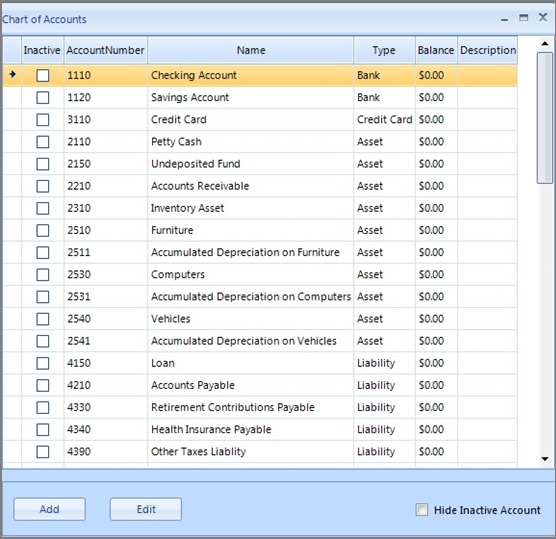
1. Start ezAccounting software, click the "Chart of Account" button to view the account list


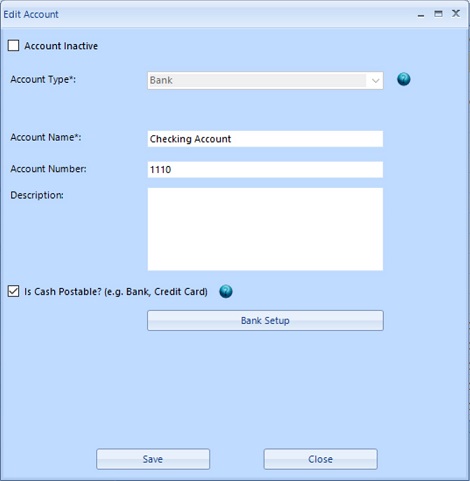
2. You can select the account from list, then click the "Edit" button to change account information


- You can rename this account, change account set up.

- If you need to adjust the balance, please refer to How to edit account opening balance after the account is set up


accounting software
From $199

Desktop Accounting & Payroll Solution

ezAccounting software is the right in house accounting solution for small businesses needing to document and report on incoming and outgoing cash flow including sales, receipts, payments and purchases. It also supports payroll processing and tax form printing.

Try the ezAccounting free demo - no credit card or obligation required.

Limited Time Offer: ezAccounting 2025 & 2026 Bundle


(back to top)

Related Topics

  • ezAccounting Quick Start Guide

  • Set up Check and Form Layout
  • How to manage customer and sales
  • How to manage vendor and purchase
  • How to write check and manage bank account

  • How to generate invoice
  • How to generate estimate/Quote

  • Sample Paychecks