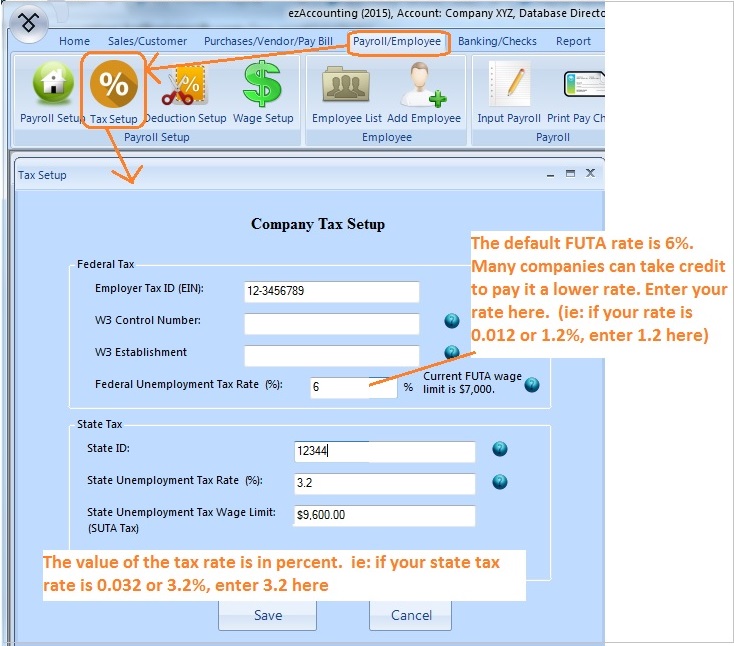
Step 1: Start ezAccounting and click top menu "Payroll/Employee", then the sub menu "Tax Setup"
You can double click the desktop ezAccounting icon to start ezAccounting.
Step 2: Federal Unemployment Tax
FUTA (Federal Unemployment Tax) is Employer-side tax only and will not be printed on paycheck stubs. The default tax rate for 2026 is 6%. However, many companies can take up to 5.4% credit. IF you do not know your FUTA rate, please contact your local IRS office.
The FUTA rate is in percent. ie: if you tax rate is 0.006 or 0.6%, you should enter 0.6 there.
Step 3: State Unemployment Tax
SUTA (State Unemployment Tax) is Employer-side tax only and will not be printed on paycheck stubs.
The SUTA rate is in percent. ie: if you tax rate is 0.032 or 0.6%, you should enter 3.2 there.
Step 4: Save your changes
Note: Reports
If you need to view FUTA and SUTA report, you can click the top menu "Reports" and click the sub menu "Employee Report", then choose "Employee Summary List".
From $199
Desktop Accounting & Payroll Solution
ezAccounting software is the right in house accounting solution for small businesses needing to document and report on incoming and outgoing cash flow including sales, receipts, payments and purchases. It also supports payroll processing and tax form printing.
Try the ezAccounting free demo - no credit card or obligation required.
ezAccounting makes it easy to track income and cost!