What Permissions Are Needed to Run ezPaycheck Payroll Software
Download Now >
Buy Now
In house Payroll Softwware ezPaycheck automates and streamline payroll processing for small businesses. You have must have full permissions to access data and run ezPaycheck to print paychecks correctly.
How can I know I have enough permission to access the database file
1. Permissions
You need to have read, write and execute permissons to access both the data folder and application folder.
1.1 The default data folder path is:
C:\Users\Public\Documents\Halfpricesoft\ezPayCheck
1.2 The default application folder path is:
C:\Program Files (x86)\Halfpricesoft\ezPayCheck
2. How to view folder permission
2.1. In Windows Explorer, right-click the file or folder you want to work with.
2.2 From the pop-up menu, select Properties, and then in the Properties dialog box click the Security tab.
2.3 In the Name list box, select the user, contact, computer, or group whose permissions you want to view.
3. How to edit folder or file permission
3.1. Right-click the file or folder for which you want to set permissions, click Properties, and then click the Security tab.
3.2. Click Edit to open the Permissions
3.3 In the Name list box, select the user, contact, computer, or group.
3.4 Select the
Allow or
Deny check box.
3.5 Save the changes
4. Sample: How to view and edit the permissions
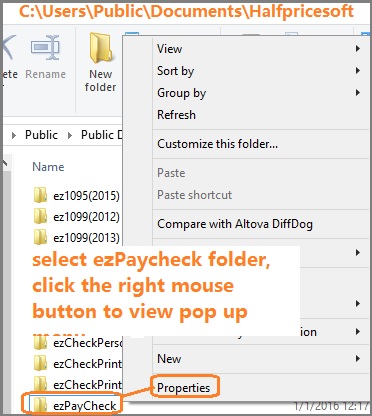
4.1. Open Windows Explore, navigate to the database folder
The default database folder path is:
C:\Users\Public\Documents\Halfpricesoft
the default folder name is "ezPayCheck"
4.2 Select the ezPaycheck folder by mouse, right click to view properties. You need to have read, write and execute permissons to access this folders and all files inside this folder.
4.3. If you do not have enough permissions, you can click the
Edit button to change the permissions. If you are not the admininstrator of this machine or you cannot change the permissions set up, please ask your IT for help.
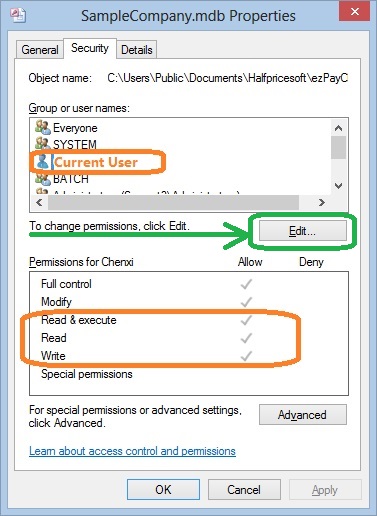
4.4. Please repeat step 4.1 to 4.3 to double check if you have updated the permissions successfully. If not, you need to contact the system administrator for help. You may not have the permissions to change settings.
Related Links:
ezPaycheck Quick Start Guide How a add a new company account How to handle both employees and contractors How to handle restaurant tips How to add a custom deduction and withhold it from each paycheck automatically How to handle local taxes How to handle State Disability Insurance (SDI) How to print paycheck in different formats: check-on-top, check-in-middle, check-at-bottom or 3-per-page How to print paycheck on blank stock How to print paycheck on pre-printed checks How to print paycheck with company logo How to adjust check printing position Sample Paychecks Determine a Company's Name for e-Filing
Download Now >
Buy Now