How to Withhold CO FAMLI(Colorado Family and Medical Leave Insurance)?
ezPaycheck payroll software is very flexible. With ezPaycheck, you can withhold CO FAMLI, Colorado Family and Medical Leave Insurance, from each employee paycheck easily.
#1 What is Colorado Family and Medical Leave Insurance(CO FAMLI)
CO FAMLI: On Nov. 3, 2020, Colorado voters approved a measure to create a Paid Family & Medical Leave program. Contributions to the program will begin January 1, 2023 with benefits payable in 2024.
#2 What is the rate?
Please visit CO state page for the latest rate!Employers and their employees are both responsible for funding the FAMLI program and may split the cost 50/50. The premiums are set to 0.9% of the employee's wage, with 0.45% paid by the employer and 0.45% paid by the employee. Employers may also choose to pay the full amount if they would like to offer this as an added perk for their employees.
Premiums are paid on wages up to the Federal Social Security Wage Cap which is $160,200 for earnings in 2023.
Source: https://famli.colorado.gov/individuals-and-families/premium-and-benefits-calculator#3 How to Withhold CO FAMLI from Employee Paychecks
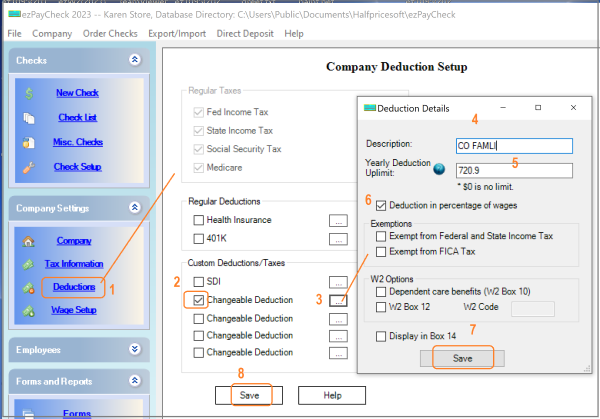
Step 1. Set up FAMLI deduction
1.1 Start ezPaycheck, click the left menu "Company Settings->Deductions" to open the
Company Deduction Setup screen.
1.2 Check one changeable deduction item, then clicked the button behind it to open the
Deduction Details screen.
1.3. Input the name (ie: "CO FAMLI" or "FAMLI" or others)
1.4. Enter Yearly Uplimit (the maximum to withhold for each employee in a year)
1.5. Check the "Deduction in percentage of wage" option box.
1.6. Click the "Save" button on
Deduction Details screen.
1.7. Click the "Save" button on
Company Deduction Setup screen to update the database.
Step 2. Edit employee settings to specify the rate of the new deduction
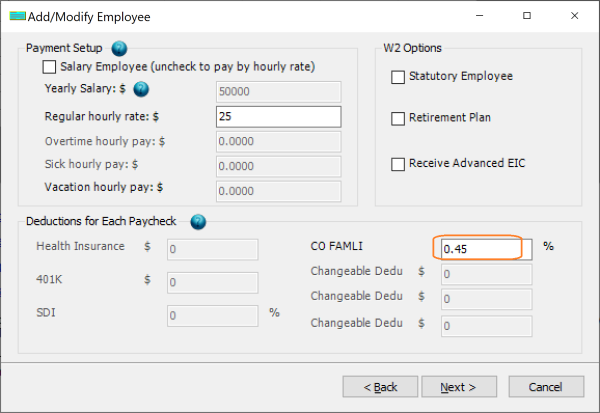
2.1. Select one employee from employee list and edit the deduction option.
2.2. Enter the percent value.
2.3. Click the "Next" button until the last page, then click the "Finish" button to save the change.
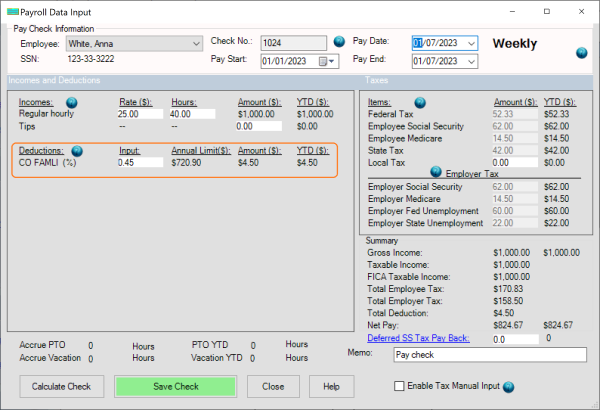
Step 3. Generate a new check
When you generate the new check, you will see this new "CO FAMLI" deduction on paycheck.
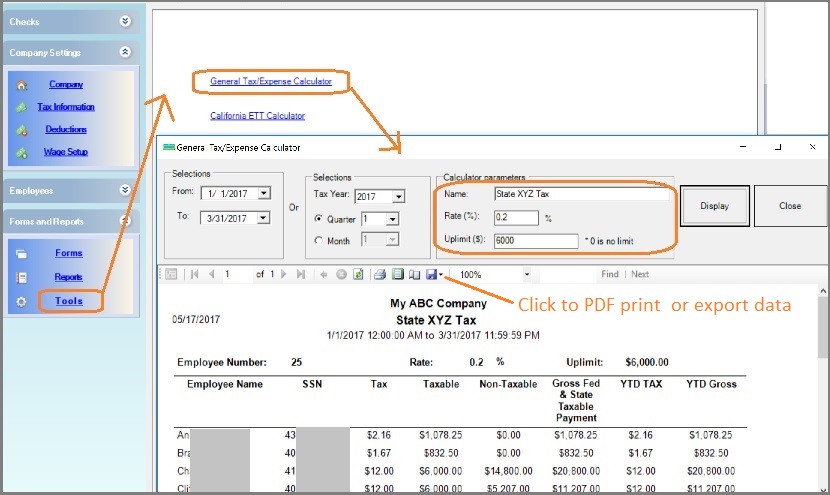
#4 Employer side Contributions
Clients can use the payroll tools to calculate employer side contributions.

From $169 | ezPaycheck Makes Payroll An Easy, In-House Task!(For Windows and Mac)
- Trusted by Thousands for Two decades.
- Calculate Federal & State Taxes, Print Paychecks, Print W2, W3, 941, 943 and 940.
- User-friendly, Easy-to-use
- No monthly fee.
Act now: automate your small business payroll today.
Try it free for 30 days with no obligation. No credit card required.
|
Troubleshooting
Why the social security tax is not correctWhy the federal income tax is not correctWhy the state income tax is not correct
Related Topics
ezPaycheck Quick Start GuideHow a add a new company accountHow to handle both employees and contractorsHow to handle restaurant tipsHow to add a custom deduction and withhold it from each paycheck automaticallyHow to handle local taxesHow to handle State Disability Insurance (SDI)How to print paycheck in different formats: check-on-top, check-in-middle, check-at-bottom or 3-per-pageHow to print paycheck on blank stockHow to print paycheck on pre-printed checksHow to print paycheck with company logoHow to adjust check printing positionSample PaychecksDetermine a Company's Name for e-Filing